Html
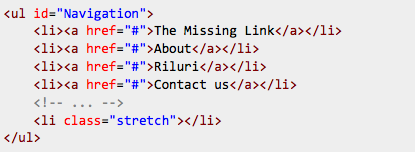
CSS
#Navigation {
list-style-type: none;
text-align: justify;
height: 21px;
background: #ccc
}

#Navigation li{
display: inline
}

#Navigation li a {
text-align: left;
display:inline-block;
}

#Navigation .stretch {
display: inline-block;
width: 100%;

/* if you need IE6/7 support */
*display: inline;
zoom: 1
}
Démonstation: http://jsfiddle.net/2kRJv/392/
Référence: http://stackoverflow.com/questions/6879467/how-do-i-justify-a-horizontal-list
POUR QUE CELA FONCTIONNE IL DOIT Y AVOIR UN ESPACE APRES CHAQUE LI
Il faut donc modifier le menu par défaut de WP en ajoutant cette fonction dans functions.php:
// Add a space after the </li> in wp_page_menu to allow justification of the menu
function add_break($break) {
    return preg_replace('/<\/li>/', '</li> ', $break, -1);
}
add_filter('wp_page_menu','add_break');
Laisser un commentaire